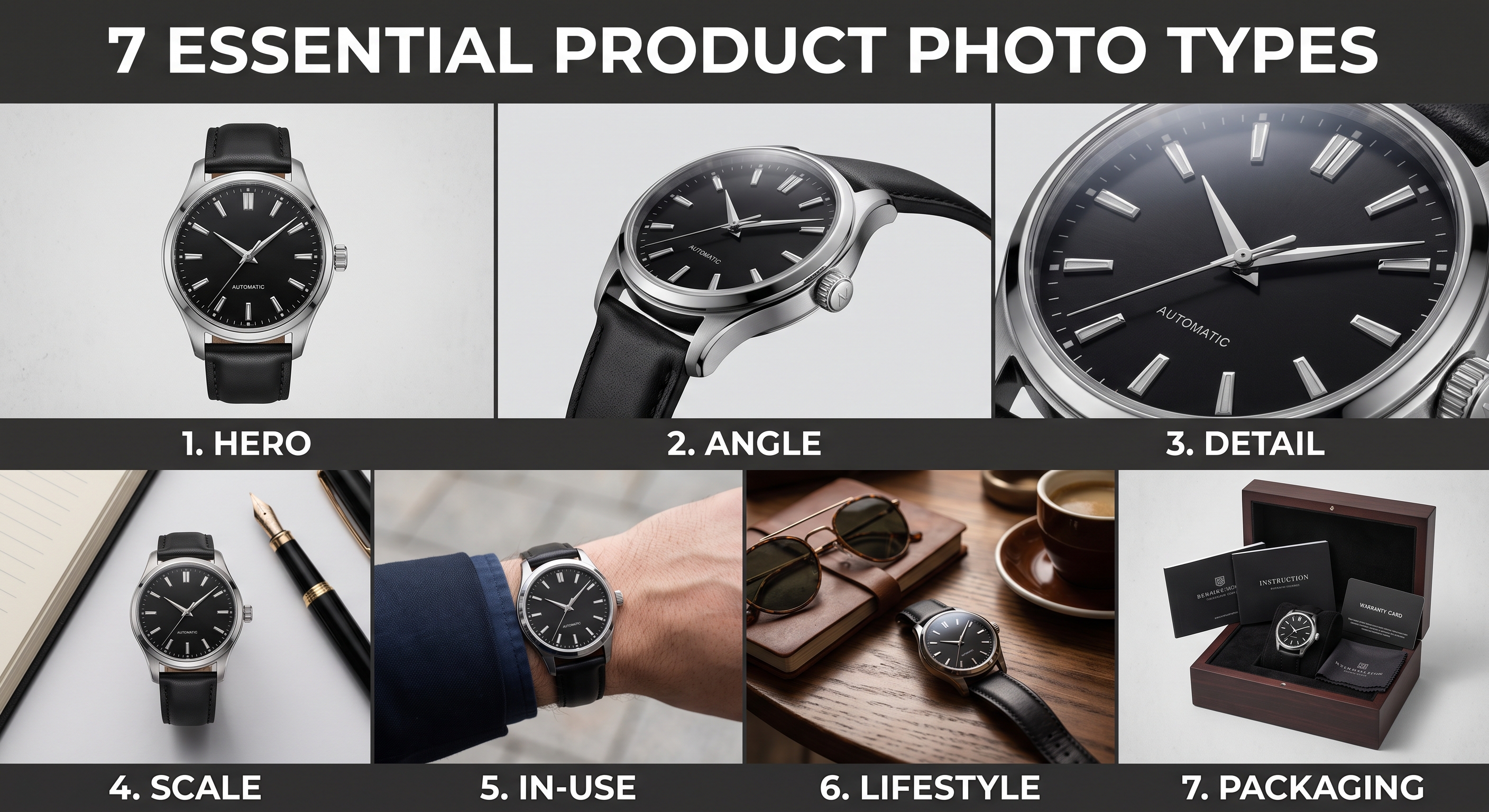
A single photo rarely sells a product online. Because buyers can't pick the item up, each photo has to answer a different question they'd otherwise ask in person: What does it look like? How big is it? What's it made of? How is it used? What do I actually get? Listings that answer those questions with a full set of photos consistently convert better and see fewer returns. Here are the seven types of product photos every listing needs, and what each one is for.
Quick answer: Every product listing needs seven types of photos: a clean hero shot as the main image, multiple angles, detail close-ups, a scale shot showing size, an in-use or demonstration shot, a lifestyle image showing context, and a packaging or what's-included shot. Together they answer every buyer question and reduce hesitation.
1. The hero shot
Your hero shot is the main image - the one that appears as your thumbnail in search results and decides whether anyone clicks. It should be a clean, sharp, well-lit photo of the product on a simple background, large and centred in the frame. This is the single most important photo in your listing, so make it your best one, and check that it reads clearly even at small thumbnail size.
2. Multiple angles
Buyers want to see the product from more than one side before they trust it. Include shots from the front, back, sides, and top as relevant, so nothing is hidden. Multiple angles remove uncertainty and reassure buyers there are no surprises - the digital equivalent of picking an item up and turning it over.
3. Detail and close-up shots
Close-ups show the craftsmanship, materials, and small features that justify your price - stitching, texture, hardware, engraving, finish. These shots build confidence in quality that a wide shot can't convey, and they're especially important for handmade, premium, or materials-driven products where the detail is the selling point.
4. A scale shot
"It's smaller than I expected" is one of the most common complaints in e-commerce and a leading cause of returns. A scale shot fixes it by showing the product's real size - held in a hand, worn, in a room, or beside a familiar everyday object. Setting size expectations before purchase saves you returns and disappointed reviews.
5. An in-use or demonstration shot
Show the product doing its job. A mug being drunk from, a bag being carried, a tool in action - in-use shots help buyers picture the product working in their own life and clarify how it functions. For anything with a use that isn't obvious from a still photo, this shot does a lot of the selling.
6. A lifestyle shot
A lifestyle photo places the product in a real, styled setting that reflects your brand and how the product fits into a buyer's life. Where an in-use shot demonstrates function, a lifestyle shot creates desire and communicates your brand's aesthetic. These are the images that make a listing feel like a brand rather than a catalogue entry.
7. Packaging and what's included
Finally, show what the buyer actually receives - the packaging and everything in the box if the product comes as a set or with accessories. This sets clear expectations, adds perceived value (especially for gifts and premium items), and reduces "is this everything?" questions and the returns that follow.
NOTE: You have room for all seven. Most platforms allow plenty of images: Amazon up to 9, Etsy up to 10 plus a video, eBay up to 24, and your own store effectively unlimited. Filling most of the slots consistently converts better than using only one or two.
Several of these - a clean hero shot, background swaps, and lifestyle scenes - can be produced from a single product photo, so you don't need a separate shoot for each one.
Turn one product photo into clean hero shots and on-brand lifestyle scenes in seconds.
Try Easy Content Studio free
Frequently asked questions
How many photos should a product listing have?
Use most of the slots your platform allows - Amazon up to 9, Etsy up to 10 plus a video, eBay up to 24, and your own store effectively unlimited. Aim to cover the seven key types: hero, angles, detail, scale, in-use, lifestyle, and packaging.
What types of product photos convert best?
A strong hero shot drives the initial click, while scale, detail, and in-use shots reduce hesitation and returns, and lifestyle shots build desire. Listings that include several types consistently convert better than those with only one or two photos.
What should the main product photo be?
A clean, sharp hero shot with the product large and centred on a simple background. It's your thumbnail in search results, so it has to read clearly even at small size and, on Amazon, sit on a pure white background.
Do I need a lifestyle photo for every product?
It's highly recommended. Lifestyle photos show the product in context and help buyers imagine owning it, which builds desire. On Etsy and your own store, they can appear anywhere; on Amazon they belong in the secondary slots.
Why are scale photos important?
Because "it's smaller than I expected" is one of the most common e-commerce complaints and a leading cause of returns. A scale shot - the product held, worn, or beside a familiar object - sets the right expectation before purchase.
What's the best order for product photos?
Lead with the hero shot, then a second angle, a detail close-up, a scale shot, an in-use or lifestyle image, variations, and packaging. The first image matters most; order the rest to answer buyer questions in the order they'd naturally ask them.
Can AI create these product photo types?
AI product photography tools can generate several of them - clean hero shots, background swaps, and lifestyle scenes - from a single photo. Detail, scale, and true in-use shots are usually best captured directly, then enhanced.