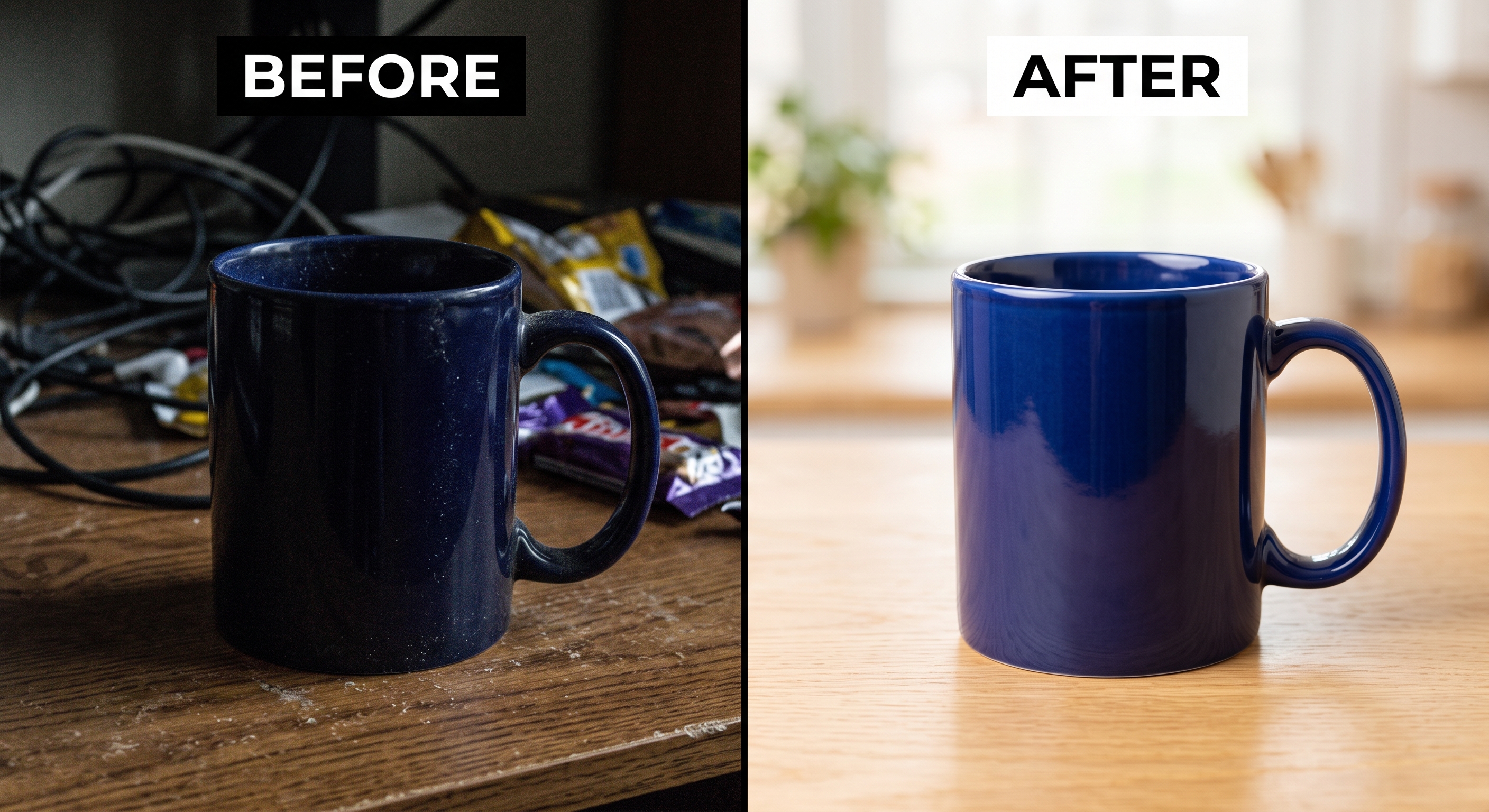
When you sell online, your photos are your storefront. Buyers can't touch the product, so they judge its quality - and decide whether to click - entirely on the images, usually in about a second. Whether you sell on your own Shopify store, on Amazon, Etsy, or eBay, a catalogue full of great products can quietly lose sales to a handful of fixable photo problems. If your listings get views but few sales, or barely get clicked at all, the cause is almost always on this list. Here are the ten most common product photo mistakes that cost online sellers sales, and exactly how to fix each one - all with a phone.
Quick answer: The most common product photo mistakes are poor or mixed lighting, a weak thumbnail image, cluttered backgrounds, too few photos, missing scale and detail shots, inaccurate colour, low resolution that disables zoom, using digital zoom or flash, heavy over-editing, and never checking the mobile thumbnail. Each one is fixable with just a phone.
How much do product photos affect online sales?
More than almost anything else in your listing. Your first photo is the thumbnail buyers see in search results and collection grids, and it single-handedly decides whether they click or scroll past - so a weak thumbnail caps how much traffic every other part of your listing ever gets to see. Beyond the click, photos drive the two behaviours that matter everywhere: click-through rate and conversion. On marketplaces, listings that get clicked and purchased rank higher, which brings more views and more sales. On your own store, photos are the entire first impression.
WARNING: On Amazon, photos can make or break visibility outright. Amazon enforces strict main-image rules and will suppress a listing whose main image doesn't comply - a suppressed listing doesn't rank, convert, or appear in search at all until you fix it.
Mistake #1: Shooting in poor or mixed lighting
Bad lighting is the number one reason phone product photos look amateur. Dim rooms make photos muddy and noisy; direct sun creates harsh shadows and blown highlights; and mixing daylight with warm household bulbs produces ugly colour casts that are hard to correct.
The fix: Shoot with soft, indirect daylight next to a window, and turn off indoor lights so you're not mixing light sources. If the sun is direct, diffuse it with a thin white curtain or a sheet of paper over the window. A single, soft light source is what makes a photo look clean and professional.
Mistake #2: A weak first photo (your thumbnail)
The first image is the most important pixel real estate in your whole shop, yet many sellers treat all their photos as equal. On every platform, the first image becomes your thumbnail in search results and category grids - and a cluttered, dark, or unclear thumbnail means fewer clicks, no matter how good the rest of the listing is.
The fix: Make your first photo a clean, sharp, well-lit hero shot with the product large and centred against a simple background. Then preview it at thumbnail size on your phone to confirm it still reads clearly when small.
Mistake #3: Cluttered or distracting backgrounds
When the background competes with the product, the buyer's eye doesn't know where to look — and confusion kills conversions. Busy tabletops, visible household objects, or messy surroundings make even a beautiful product look unprofessional.
The fix: Use a clean, neutral background for your main shot so nothing distracts from the product. Requirements vary by platform: Amazon requires a pure white main image, while Etsy, eBay, and your own store welcome styled and lifestyle scenes in the other slots - but keep them intentional, not accidental clutter.
Mistake #4: Uploading too few photos
Listings with only two or three photos leave buyer questions unanswered, and unanswered questions become abandoned carts. Buyers want to see the product from every angle before committing.
The fix: Use most of the slots your platform gives you - Amazon allows up to 9 images, Etsy up to 10 photos plus a video, eBay up to 24, and your own store is effectively unlimited. More angles reduce uncertainty and convert better, so show multiple angles, close-ups, scale, variations, and context rather than the bare minimum.
Mistake #5: No scale or detail shots
A photo that doesn't convey size leads to disappointed buyers and returns - "it's smaller than I thought" is one of the most common complaints in e-commerce. Likewise, missing close-ups hide the craftsmanship or materials that justify your price.
The fix: Include at least one shot that shows scale (the product held in a hand, worn, in use, or beside a common object) and at least one close-up of texture, stitching, or material. These build confidence and reduce returns.
Mistake #6: Inaccurate colour
If the colour on screen doesn't match the product that arrives, you get returns, bad reviews, and lost repeat customers. This usually comes from mixed lighting or heavy editing that shifts the product's true colour.
The fix: Shoot in neutral daylight and correct the white balance in editing so whites look white and colours are accurate. Use the sRGB colour space so colours display correctly across devices and platforms. And resist filters that make the image look good but misrepresent the product - accurate colour is a trust signal and a return-rate reducer.
Mistake #7: Low-resolution images that disable zoom
Online shoppers zoom in to inspect details before buying, and every platform switches zoom off below a minimum resolution - roughly 1,000px on Amazon, 1,600px on eBay, 800px on Shopify, and 2,000px on Etsy. Below the threshold, buyers can't inspect the product closely and trust drops. Blurry or pixelated images also signal low quality regardless of how good the product actually is.
The fix: Shoot and upload at full resolution. A square image of at least 2,000px (2048 × 2048 is a safe universal target) enables zoom everywhere and looks sharp on modern high-resolution screens. Upload the original file rather than a pre-compressed copy so the platform doesn't soften it further.
TIP: Keep one high-resolution master image per product at 2048 × 2048 px (square). It satisfies the zoom requirement on every major platform, and you can resize down from it for anywhere with tighter limits - never scale a small image up.
Mistake #8: Using digital zoom or flash
Both quietly destroy quality. Digital zoom crops into the sensor and throws away detail, producing soft, grainy images. The built-in flash flattens the product, creates harsh reflections, and casts unnatural colour.
The fix: Never use digital zoom - physically move the phone closer instead. And skip the flash entirely; rely on soft window light. If you need more light, add a reflector, not the flash.
Mistake #9: Heavy over-editing and filters
Over-processed photos - crushed contrast, oversaturated colours, aggressive filters, or heavy sharpening - look artificial and untrustworthy, and they misrepresent what the buyer will receive. Ironically, trying too hard to make photos "pop" makes them convert worse.
The fix: Edit with a light touch. Lift brightness, correct white balance, add a small amount of contrast, and sharpen subtly. The goal is the real product looking its best on a good day - not a different product.
Mistake #10: Never checking the mobile thumbnail
The majority of e-commerce traffic is on mobile - over 70% on many stores - where your thumbnail appears very small, and platforms may crop it differently than on desktop. A photo that looks great full-screen can be cropped awkwardly or become unreadable as a mobile thumbnail, and most sellers never check.
The fix: Before publishing, open your listing on your phone and look at how the thumbnail actually appears in search. Leave breathing room around the product so it survives cropping, and confirm the hero image still reads clearly at thumbnail size.
Fixing these without reshooting everything
If you've already got a catalogue full of listings with some of these problems, you don't necessarily have to reshoot every item from scratch. AI product photography tools can clean up backgrounds, standardise lighting and colour, and turn plain phone photos into consistent studio-quality or lifestyle images across a whole shop - including hitting Amazon's exact-white main-image requirement.
Frequently asked questions
Why aren't my product photos getting clicks?
Usually because of a weak first photo. Your thumbnail decides whether buyers click, so if it's dark, cluttered, low-resolution, or unclear at small size, click-through drops regardless of product quality. Fix the hero image first: a clean, sharp, well-lit shot with the product large and centred, checked at thumbnail size on mobile.
How many product photos should a listing have?
Use most of the slots your platform allows - Amazon up to 9 images, Etsy up to 10 plus a video, eBay up to 24, and your own store effectively unlimited. More photos consistently convert better because they answer more buyer questions with angles, close-ups, scale shots, and lifestyle context.
What makes a good product thumbnail?
A good thumbnail is a clean, sharp, well-lit hero shot with the product large and centred against a simple background, with breathing room so it survives cropping. It should read clearly even at the small size shown in mobile search results, where most online browsing happens.
Why do my product photos look different from the real product?
Usually mixed lighting or heavy editing. Shooting under a mix of daylight and household bulbs, or applying strong filters, shifts the product's true colour. Shoot in neutral daylight, use the sRGB colour space, and correct white balance in editing so colours are accurate — this reduces returns and bad reviews.
Does photo quality affect search ranking?
Indirectly but significantly. Photos don't rank your listing on their own, but they drive click-through and conversion, which marketplace algorithms reward. On Amazon, a non-compliant main image can even get the listing suppressed, and low-resolution images that disable zoom hurt everywhere - so quality photos help both engagement and visibility.
Can I fix bad product photos without reshooting?
Often yes. AI product photography tools can remove or replace cluttered backgrounds, standardize color and lighting, and turn phone photos into consistent studio-quality or lifestyle images across a whole catalogue - useful when reshooting every listing isn't practical.
What size should product photos be?
At least 2,000 pixels on the shortest side, with a 2048 × 2048 square being a safe universal target that enables zoom across platforms and looks sharp on high-resolution screens. Minimum zoom thresholds differ (about 1,000px on Amazon, 1,600px on eBay, 800px on Shopify, 2,000px on Etsy). Use JPG or PNG and upload the full-resolution original.