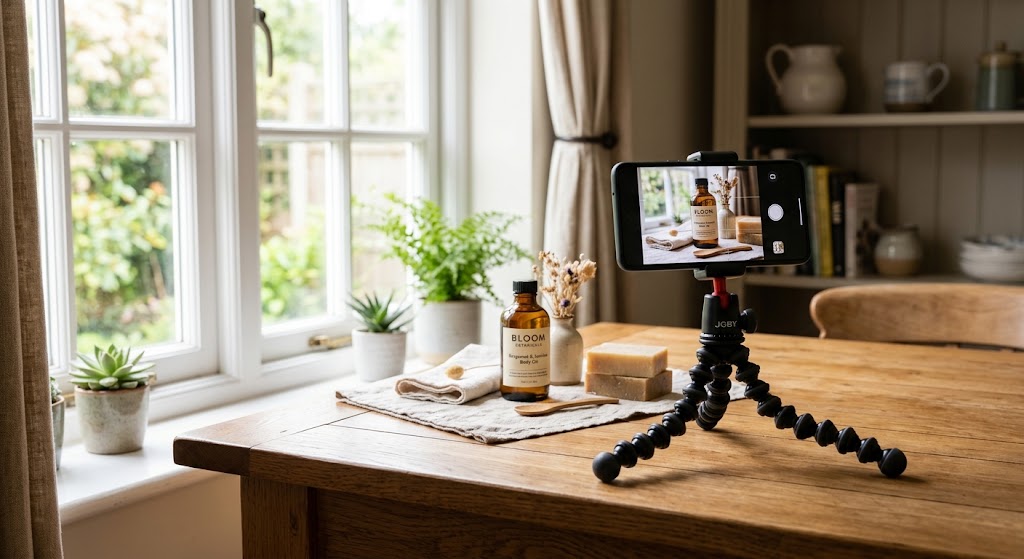
Most Etsy shoppers decide whether to click your listing in about a second, and that decision is made almost entirely on your first photo. The good news: you don't need a DSLR, a studio, or a photographer to compete. A modern smartphone already has a camera good enough for Etsy. What actually separates a listing that converts from one that gets scrolled past is light, background, composition, and a few camera settings most sellers never touch. This guide walks through the entire process, from setup to upload, using only a phone and a few things you probably already own.
Quick answer: You can shoot professional-quality Etsy product photos with any modern smartphone. Use soft, indirect daylight near a window, a clean, uncluttered background, and your phone's grid to keep the product straight and centred. Tap to lock focus and exposure, shoot at full resolution, then lightly edit for brightness and colour. Upload images at least 2000px on the shortest side.
Can you take professional Etsy product photos with just a phone?
Yes. Phone cameras from the last few years capture more than enough resolution and detail for Etsy, which only requires images to be at least 2000 pixels on the shortest side. The limitation is rarely the camera - it's the conditions you shoot in. An expensive camera in bad light produces a worse photo than a phone in good light.
What buyers actually respond to is a clear, well-lit, honest representation of the product. Etsy shoppers are specifically looking for handmade and small-batch items, so slightly imperfect, real photos often outperform sterile catalogue shots. Your phone is more than capable of delivering that. The rest of this guide is about controlling the four things that matter: light, background, camera setup, and composition.
What do you need to photograph products with your phone?
You can start with almost nothing. A workable phone photography kit costs very little, and most of it is improvised:
- A window with indirect daylight - your main light source, and it's free.
- A clean background - a roll of white or neutral paper, a sheet of poster board, a piece of fabric, or a plain tabletop.
- A white reflector - a piece of white foam board, card, or even a folded bedsheet to bounce light back and soften shadows.
- Something to prop the phone - a cheap phone tripod (around $15) or a stack of books. Stability matters more than most people expect; it prevents blur and keeps framing consistent across a whole listing.
- A cloth to clean your lens - the single most overlooked step.
That's the entire baseline. Everything beyond it (a lightbox, LED panels, backdrops) is optional and can wait until you have sales to justify it.
TIP: Clean your lens before every shot. A single fingerprint softens every photo you take, and it's the most common reason phone product shots look hazy.
How do you set up lighting for phone product photography?
Lighting is the highest-leverage part of the whole process. Get it right, and even a basic phone photo looks professional.
Use soft, indirect daylight. Set up next to a window that doesn't have direct sun streaming through it. Direct sunlight creates harsh, hard-edged shadows and blown-out highlights; the light on an overcast day, or the indirect light from a north-facing window, is soft and even - exactly what you want. If the sun is direct, tape a sheet of white paper or a thin white curtain over the window to diffuse it.
Put the product beside the window, not under a ceiling light. Overhead household lights and warm bulbs cast unflattering shadows and colour casts that are hard to fix later. Whenever possible, turn off indoor lights and shoot with daylight only, so you're not mixing two different colours of light.
Bounce light back with a reflector. Position your white foam board or card on the opposite side of the product from the window. This fills in the shadow side and softens contrast, giving you a balanced, even look without any equipment.
Shoot at a consistent time of day. Light changes hour to hour. Photographing a whole catalogue in one session, in the same spot, keeps your shop visually consistent - which builds trust across your listings.
What's the best background for Etsy product photos?
Here's something many sellers get wrong: Etsy doesn't require a white background. Unlike Amazon, which mandates pure white, Etsy actively encourages lifestyle imagery, styled backdrops, and props. That gives you creative freedom Amazon sellers don't have.
That said, a clean background is still the safest default for your main photo, because it removes distractions and puts the product first. A few reliable options:
- Seamless white or light neutral - professional, universal, makes colours pop. Best for your first/thumbnail image.
- Natural textures - light wood, linen, marble, or stone for warmth and a handmade feel.
- On-brand styled scenes - a considered background with a few props that hint at how the product is used.
Whatever you choose, keep it uncluttered and let the product dominate the frame. A good pattern is to use a clean background for your hero shot and lifestyle or styled scenes for the supporting images, so buyers get both clarity and context. For a full walkthrough, see our guide to getting a clean white background without a studio.
How do you set up your phone camera for product photos?
Most sellers shoot on full auto and leave a lot of quality on the table. A few adjustments make an immediate difference:
- Clean the lens first. Every time. Fingerprints are the number one cause of soft, hazy phone photos.
- Turn on the grid. In your camera settings, enable the gridlines. They help you keep the product level and centred and make composition far easier.
- Shoot at full resolution. Use the highest-quality setting your camera offers and, if available, a format that preserves detail. You want as many pixels as possible to work with when editing and cropping.
- Tap to set focus, then lock exposure. Tap the screen on your product to focus. On most phones, press and hold to lock focus and exposure (often shown as "AE/AF Lock") so they don't drift between shots.
- Adjust exposure manually if it looks dark. After tapping to focus, slide the little sun icon up or down to brighten or darken the shot. Product photos usually look best slightly bright and airy.
- Never use digital zoom. Zooming crops into the image and destroys detail. Physically move the phone closer instead.
- Avoid the flash. The built-in flash flattens the product and creates harsh reflections. Stick to your window light.
How do you style and compose an Etsy product photo?
Composition is what turns a clear photo into one that sells. A few principles:
- Fill the frame, but leave breathing room. The product should be the obvious subject, with a little margin around it. That margin matters because Etsy crops images differently across search results, listing pages, and mobile - so a product jammed to the edges can get awkwardly cut off in the thumbnail.
- Shoot straight on and from above. The two most useful angles for most products are eye-level (straight on) and a top-down flat lay. Pick what shows the product best and keep it consistent.
- Use the rule of thirds. With the grid on, place key elements along the lines or where they intersect, rather than dead centre every time, for a more natural, professional feel.
- Show scale and detail. Include at least one shot that conveys size (product in a hand, next to a common object, or being worn or used) and one close-up of texture, stitching, or material.
- Plan your photo slots as a sequence. Think of each image slot as answering a buyer question: What is it? What does it look like up close? How big is it? How is it used? What does it come with?
TIP: Most Etsy traffic is on mobile. Before publishing, open your listing on your phone and check how the first photo looks as a small thumbnail - leave margin around the product so it survives cropping.
How do you edit product photos on your phone?
You don't need Photoshop. Free mobile apps like Snapseed, Lightroom Mobile, or your phone's built-in editor handle everything a product photo needs. The goal of editing is to make the photo look like the real product on a good day - not to fake it.
Adjust, in roughly this order:
- Crop and straighten to your chosen aspect ratio, keeping the product centred with margin.
- Exposure/brightness - lift it so the image feels light and clean.
- White balance - neutralise any colour cast so whites look white and your product's real colours show accurately. Accurate colour prevents returns and bad reviews.
- Contrast and shadows - a small contrast boost adds punch; lifting shadows keeps detail visible.
- Sharpening - a light touch makes detail crisp. Overdoing it looks artificial.
Two rules: keep every photo in a listing edited consistently, and never distort the product's true colour or shape. Etsy buyers expect what they see to match what arrives.
If shooting and editing every angle for every product feels like a lot — especially for a large catalogue — an AI product photography tool can produce the polished result without reshooting.
Turn a plain phone photo into clean, studio-quality Etsy images in seconds. Try Easy Content Studio for free
What are Etsy's photo requirements and recommended sizes?
Etsy's technical specs are straightforward, and meeting them affects both how sharp your images look and how well the listing performs:
- Minimum resolution: at least 2000 pixels on the shortest side. Below this, Etsy disables the zoom feature - and buyers who can't zoom in are less likely to buy.
- Recommended resolution: around 3000 × 3000 pixels for the sharpest zoomed-in view.
- Aspect ratio: Etsy crops thumbnails differently across contexts, so a square (1:1) image is the safest choice for avoiding surprise cropping on mobile. Whatever ratio you use, leave margin around the product.
- File formats: JPG, PNG, and GIF are accepted. If you use PNG, flatten it first - transparent areas can render as a black background on Etsy.
- Colour: Use the sRGB colour profile so colours display accurately across devices.
- DPI: irrelevant for web display. Only pixel dimensions matter, so ignore DPI and focus on hitting the resolution above.
- Upload the original. Upload the full-resolution file straight from your phone rather than a pre-compressed copy, to avoid Etsy compressing an already-compressed image and softening it further.
How many photos should an Etsy listing have?
Etsy lets you upload up to 10 photos plus one short video (5–15 seconds), and you should use most of them. Listings with seven or more photos consistently outperform those with fewer, because more angles reduce buyer uncertainty.
A strong 10-slot sequence looks like this: a clean hero shot on a neutral background; the product from a second angle; a close-up of detail or texture; a scale or in-use shot; a lifestyle or styled scene; any variations (colours, sizes); what's included; packaging; and a final lifestyle or context image. Your first photo is by far the most important - it's your thumbnail, and it decides whether anyone sees the other nine.
What are the most common Etsy phone photography mistakes?
- Shooting in bad or mixed light - dim rooms, direct sun, or a mix of daylight and household bulbs.
- A smudged lens - a two-second wipe fixes it.
- Using digital zoom or flash - both degrade quality.
- Cluttered or distracting backgrounds that pull attention off the product.
- Only uploading two or three photos and leaving buyer questions unanswered.
- Heavy filters or over-editing that misrepresent the product's real colour.
- Never checking the thumbnail on mobile - most Etsy traffic is mobile, so preview how the cropped thumbnail actually looks on a phone before publishing.
Avoid those, apply the light-background-camera-composition process above, and a phone is genuinely all you need to build a professional-looking Etsy shop. For the full rundown, see 10 product photo mistakes that cost you sales.
Frequently asked questions
Do you need a professional camera to sell on Etsy?
No. A modern smartphone captures more than enough resolution and detail for Etsy listings. Good lighting, a clean background, and correct camera settings matter far more than the device. Photographers routinely produce listing-quality images on phones.
Does Etsy require a white background?
No. Unlike Amazon, Etsy doesn't require white backgrounds and actively encourages lifestyle photography, props, and styled scenes. A clean background is still a smart default for your main thumbnail image because it minimises distraction, but you're free to be creative in your supporting photos.
What size should Etsy photos be?
Etsy recommends listing photos of at least 2000 pixels on the shortest side, with around 3000 × 3000 pixels ideal for sharp zoom. Images below 2000 pixels can't be zoomed, which reduces buyer confidence. Use JPG or PNG and upload the full-resolution original.
How many photos can you upload to an Etsy listing?
You can upload up to 10 photos plus one video (5–15 seconds) per listing. Listings with seven or more photos tend to convert better, so it's worth filling most of the slots with different angles, close-ups, scale shots, and lifestyle images.
Is natural light or artificial light better for product photos?
For phone photography, soft indirect natural daylight from a window is usually the easiest way to get professional results with no equipment. Avoid direct sun (too harsh) and mixing daylight with household bulbs (creates colour casts). Artificial lighting can work but requires more setup and control.
Can you use AI to improve phone product photos?
Yes. AI product photography tools can turn a simple phone photo into clean studio-style or lifestyle images, remove or replace backgrounds, and standardise a whole catalogue quickly. They're especially useful for large shops where reshooting every item is impractical, though understanding lighting and composition still helps you get the best input.
What's the best free app to edit Etsy product photos?
Free apps such as Snapseed, Lightroom Mobile, or your phone's built-in photo editor cover everything a product photo needs: cropping, brightness, white balance, contrast, and light sharpening. The goal is accurate, consistent editing across a listing - not heavy filters that misrepresent the product.